



Since I started using Proxmox at home I have been pretty impressed with not only the capabilities, but also the development going into the product. I recently setup their own backup server and not soon after they release the new Proxmox Backup Server 4.0 that added a new feature to use S3 compatible storage. For some time I have used Backblaze B2 for some things as it’s the lowest cost for my use case and now I wanted to figure out a way to add “Archive” copies of the Proxmox backups I am doing locally on a NAS mount to a Backblaze B2 bucket. What I can say is it was very easy, with a few minor tweak, and I found a trick to setup “Local” datastore sync capability without actually having another backup server instance.
Setting up Backblaze B2 with Proxmox Backup Server
The first thing is you need to do is male sure you have the new 4.0 version installed as the tech preview for S3 use is only in that version. Once you have it setup it’s a two step process. I am going to assume you know how to setup and use Backblaze B2 for the purpose of this walk through.
- Add your S3 endpoint
- Create the datastore
To create the S3 endpoint you just need a few things from your Backblaze account which are pretty standard, but a couple things to point out specific to Backblaze B2. I will assume that for the purposes of this, folks know how to create a bucket and application keys in Backblaze B2


- S3 Endpoint ID: This is just the name you will find this by in a later step, pick a name
- Endpoint: The bucket endpoint such as (s3.us-west-000.backblazeb2.com)
- Access Key: This is the B2 keyID you created
- Secret Key: This is the B2 applicationKey you created
- Path Style: This needs to be checked for B2 specifically
- Provider Quirks: This needs to he set to “Skip If-None-Match header” for B2 specifically
Once you have the S3 Endpoint setup, creating the datastore is easy with a few notes


- Name: This is the text name that will show in the datastore list
- Does not impact the S3 Bucket folder name
- Datastore Type: Choose S3 (Tech Preview)
- Local Cache: Something like /mnt/B2Bucket but…
- Whatever you use here will create a folder in the B2 Bucket
- You’d need this name later if you wanted to take control of this as an existing datastore later
- In my case I made the “Name” and Local Cache the same name to easily identify that
- S3 Endpoint ID: The item you create in the previous step
Creating a Local Sync to Backblaze B2
Now that you have both a true local datastore and a new Backblaze B2 datastore setup in the same Proxmox Backup Server, you can setup a datastore sync to create offsite copies of your local backups which is very simple using the built in “Pull” job. Start by highlighting the B2 datastore in the tree and going to the”Sync Jobs” Tree.

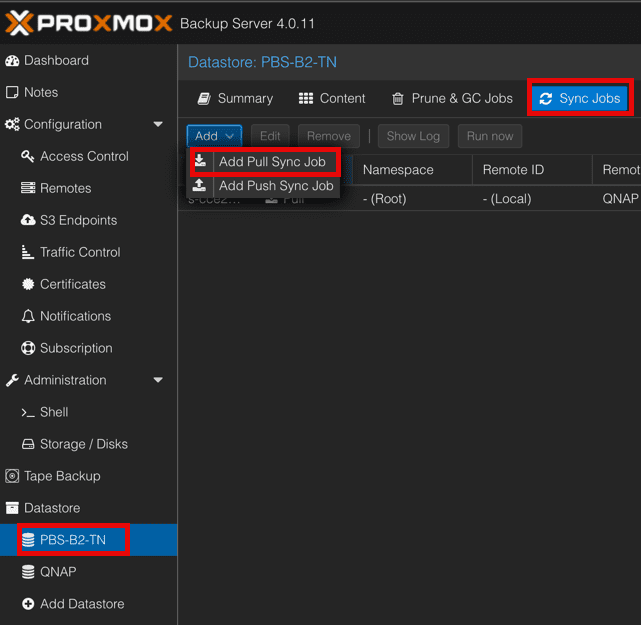
These will be the options you get and you can play with some as you see fit


- Local Datastore: Should be the Backblaze B2 one
- Local Namespace: I use namespaces so I sync Root to get them all
- Local Owner: Whatever user you choose I use a specific user for this process
- Location: Choose “Local”
- Source Datastore: Select the NAS or other none B2 backed datastore
- Remove Vanished: I check this to keep things clean and save storage
Now that this is done on whatever schedule you want, you will get copies of your local backups pulled up to the B2 datastore for offsite copy and later mounting by a different Proxmox Backup Server if needed in the event you lose the original one. I may cover that later.